Time to get some data
After a lot of Googling it appears there’s not much out there on shipping container temperature studies. Not to the level of detail that we need. ContainerHomes.net did a page and video on the subject with spot temperature checks and it’s not a bad comparison. See https://containerhomes.net/articles/how-hot-do-shipping-containers-get/. But it looks like I’m gonna have do this with a lot more of the scientific method in mind and completely from scratch.
The solution has to be cheap, customizable, scalable, programmable, robust against 66C/150F degree heat, remotely accessible (eventually)… and did I mention cheap? Beaglebone Black to the rescue! What’s a Beaglebone Black? Similar to Rasberry Pi, Beaglebone is a low-cost, community-supported development platform for developers and hobbyists. Boot Linux in under 10 seconds and get started on development in less than 5 minutes with just a single USB cable. Visit https://beagleboard.org/black for more information.

From ~$65 at the time of this writing, the Beaglebone Black Rev. B was the first widely produced and distributed version and for many developers was the board that gave them an alternative to Rasberry Pi. Not that there’s anything wrong with the Pi Family, it’s a very capable and powerful platform. It’s just not for everyone. To many developers Beaglebone Black’s open source design and non-proprietary operating system allows for a more generic development platform. Over the years since both board’s releases many other development boards have hit the market along with companies who have designed and built peripherals for all of them. The best news of all is that the development community has contributed a lot of code already to be shared and improved upon. Chances are there’s already a peripheral or component and some code out there that you can take and adapt for your own needs. Everyone wins.
Did I mention that they’re relatively cheap AND robust? With potential temperatures inside the container reaching close to or in excess of the board’s upper limits there’s a real good chance that any 100+ degree Texas day could result in frying our Beagle. Ouch! Which is why I opted for using one of my old Beaglebone Black boards instead of one of the newer Wireless or increased capability versions.
Beagle Temp Board – SN1
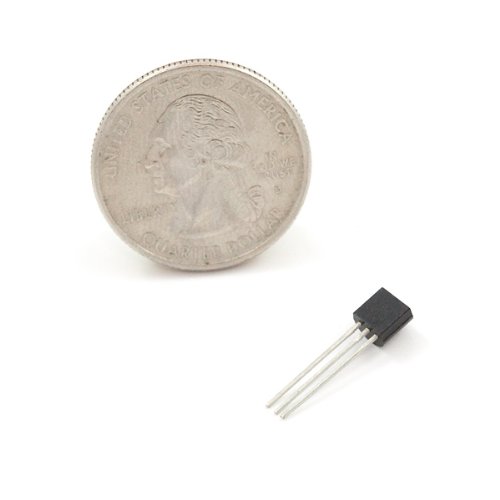
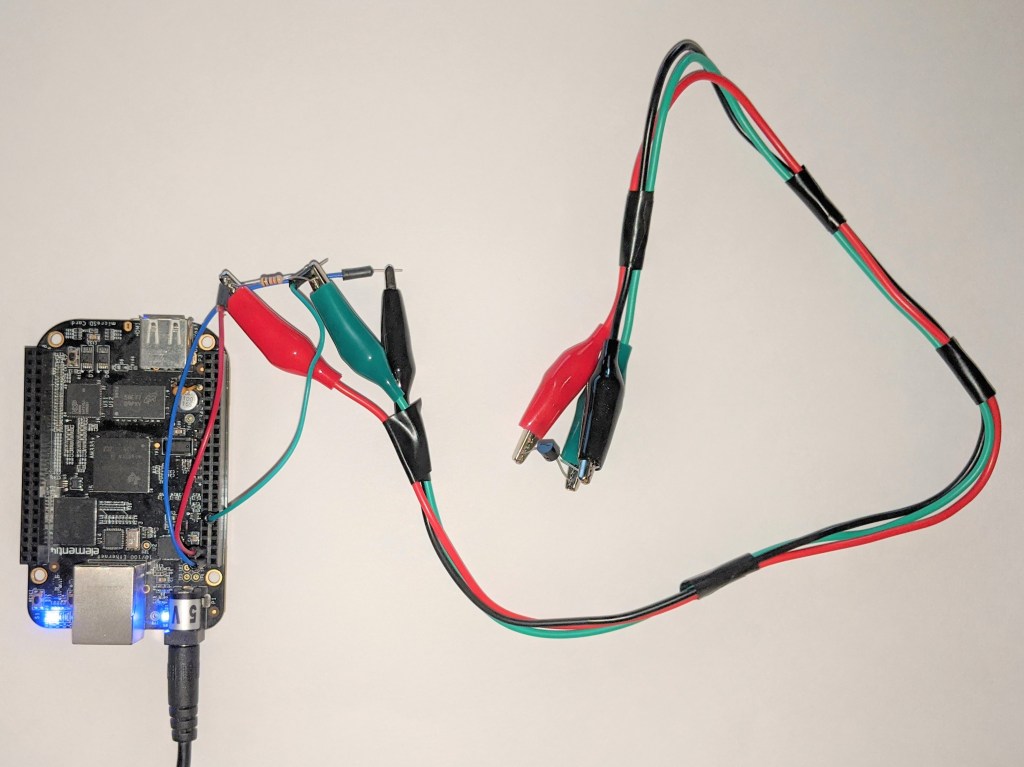
Serial Number 1’s design was going to be simple and a throw-away, or “burn-away”, if needed. I didn’t even solder the connections or use waterproof components. “Bailing wire and bubble gum for SN1.” To get things started all I needed was the Beaglebone board, a DS18B20 digital sensor, a resistor, a few jumpers and some alligator clip cables. A short python script for gathering and logging the sensor’s digital data to a simple CSV file would also suffice.

import time
import os

w1 = "/sys/devices/w1_bus_master1/28-3cabcabcabcabc/w1_slave"

while True:
    raw = open(w1, "r").read()
    print
    "Temperature is " + str(float(raw.split("t=")[-1]) / 1000) + " Celsius / " + str(
        float(raw.split("t=")[-1]) / 1000 * 1.8 + 32) + " Fahrenheit"
    time.sleep(5)
    os.system('clear')
Running the command python display_temp.py was enough to get a raw output one at a time every 5 seconds, even if it wasn’t being logged to a CSV file yet. The next version adds the logging capability.
# import time - don't need this one
from time import sleep, strftime, time
import os

w1 = "/sys/devices/w1_bus_master1/28-3cabcabcabcabc/w1_slave"

while True:
    raw = open(w1, "r").read()
    print
    "Temperature is " + str(float(raw.split("t=")[-1]) / 1000) + " Celsius / " + str(
        float(raw.split("t=")[-1]) / 1000 * 1.8 + 32$
    sleep(5)
    with open("/var/lib/cloud9/DS18_temps.csv", "a") as log:
        temp = float(raw.split("t=")[-1]) / 1000
    log.write("{0},{1}\n".format(strftime("%Y-%m-%d %H:%M:%S"), str(temp)))
    os.system('clear')
Interesting factoid, each DS18B20 gets its own unique identifier (28-XXXXXX…) requiring hard coding to read. The other good news is the newest versions of the BB now don’t require special configuration or enabling of the GPIO (digital) ports used to connect to devices like this temperature sensor. Just plug them in and check the /sys/devices/ folder where you should find its unique folder. That’s it.
This code worked fine as long as I was logged into the board and running the python command manually but because it wasn’t running as a service that launches on start-up another bit of coding was required to create an autostart script. Now all I had to do is run an extension cord out to the container, drill a hole to pass the power cable through (easier said than done), and then power up the board using a 5V 2Amp power supply.
Did I mention drilling a hole in CORTEN steel is easier said than done? Well, I didn’t even try. Not really. Shipping containers are made to stay afloat for weeks if lost at sea but they still require something that can equalize air pressure with the outside. When facing either side of a shipping container you’ll see a rectangular plastic box epoxied and riveted to the top right corner of the container. This little box covers 9 small, 1cm holes that if you can get to them you might be able to widen them with a drill or that you can pass wires through. After smashing this very hard plastic box the pieces were fairly easy to remove. But drilling the holes wider was a no-go. Two drill bits and a burned out Harbor Freight cheap drill later and I was no further along than when I started. Time to think cheap. This is temporary after all.
After I ran an extension cord from a nearby building and plugged in the Beaglebone’s DC power block I passed the thin end of the power cord through the 1cm hole and I was in business. A few feet of Duct/Gorilla Tape and everything was secured to the side as well as covering the holes to keep out the mud daubers. This is Texas, if you whistle too long a mud dauber wasp will build a nest in your mouth. I stepped down the ladder and stepped back into the container, which was now easily over 38C/100F even at 10am, to plug in the Beaglebone board’s power and it’s kludged together temperature sensor. “Flashing lights, that’s a good sign. Let’s hope you survive up to 150F little beagle.”
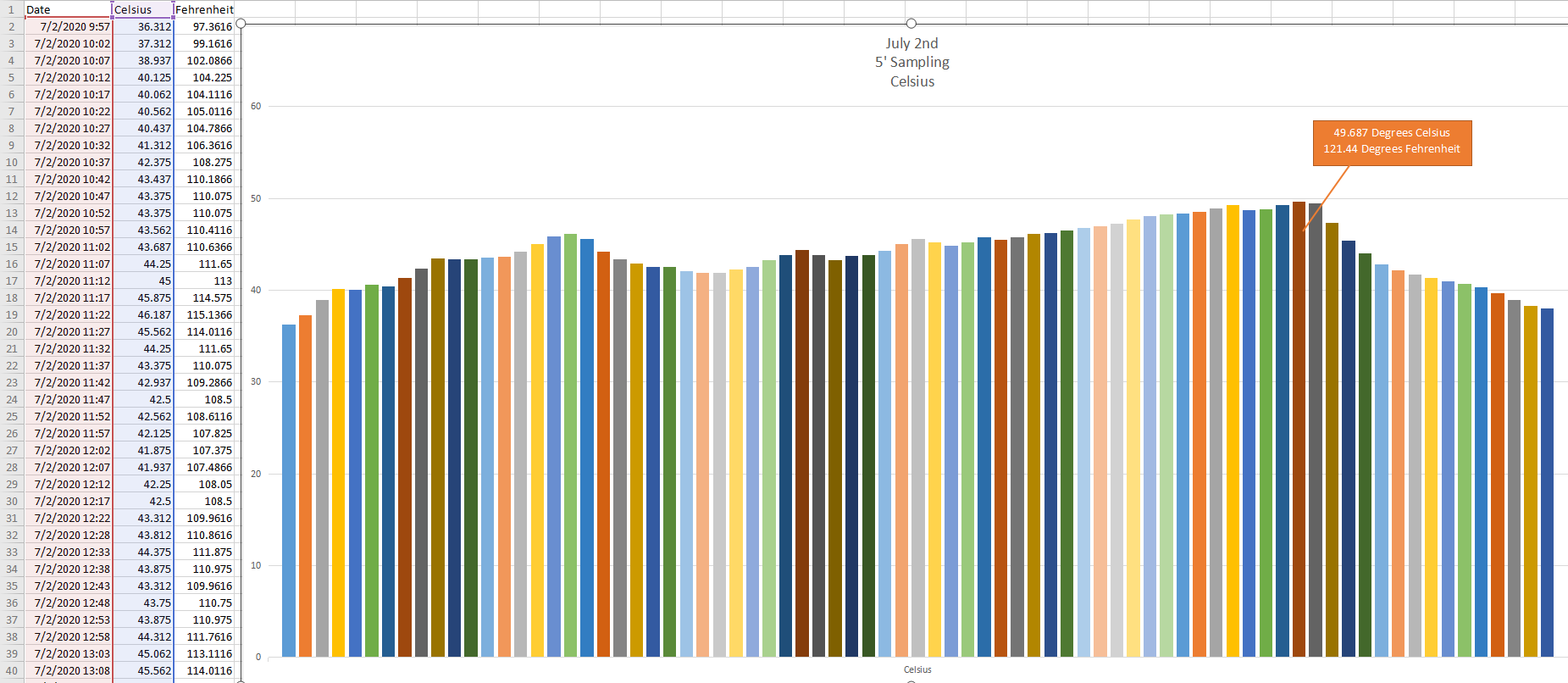
After about 7 hours I ventured back out to see if it was still alive and to transfer the data to my laptop. Did I mention that this older BB wasn’t wifi capable? Not that it matters, getting wifi inside a shipping container is almost impossible as it’s essentially a giant metal Faraday cage. When I find the time, I’ve gotta run a CAT5 network cable out as well so I can pull the BB’s temperature data from inside the house.
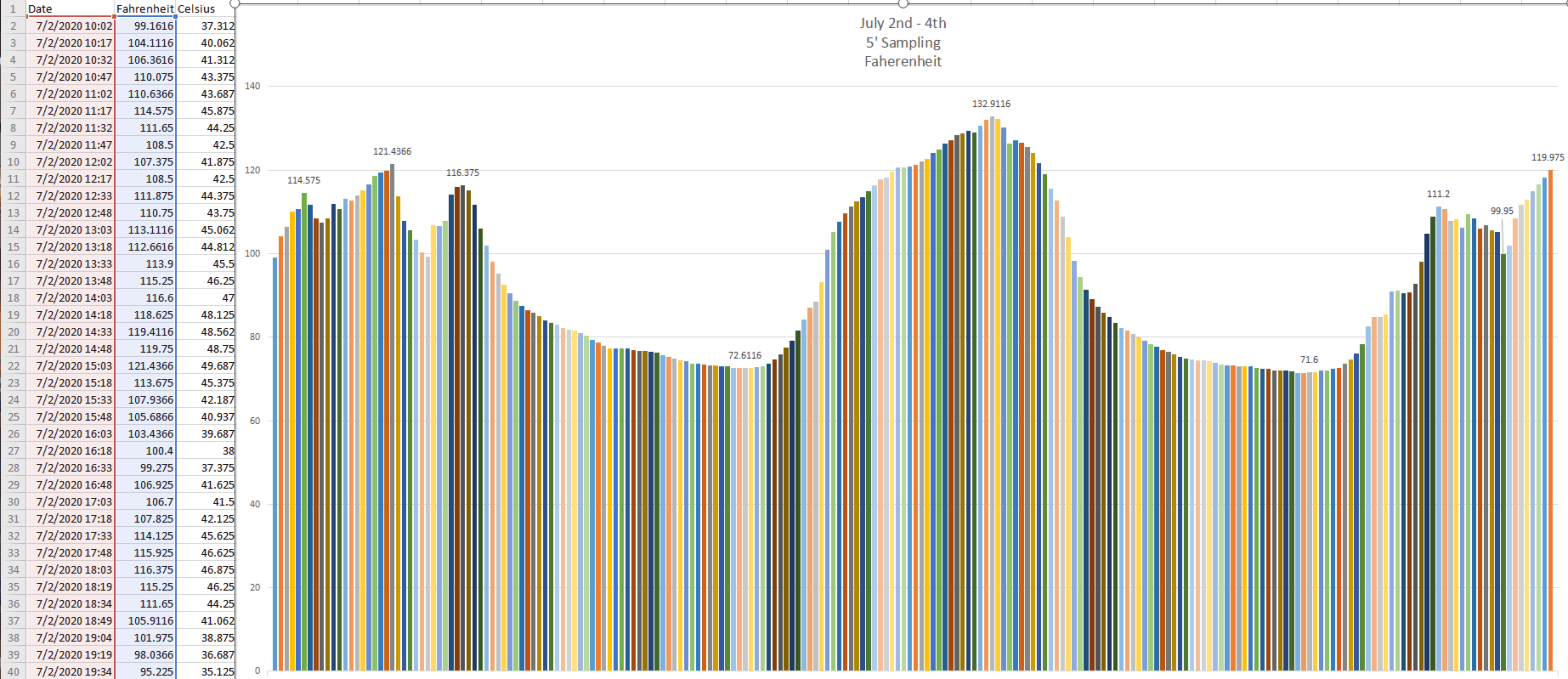
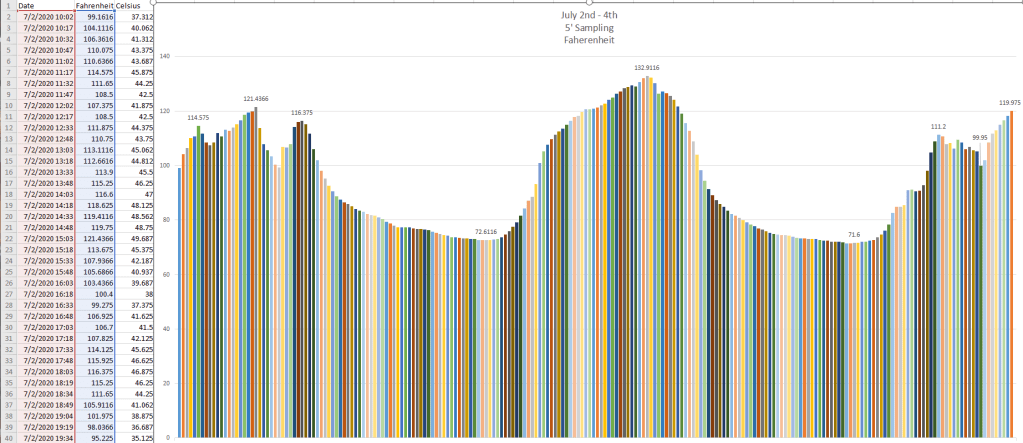
And here’s what the data looks like after a few more days of sampling. I love it when a plan comes together.
More Questions
I had to put the Beaglebone board on top of some shelves so the power cord would reach from outside, which made me wonder if it gets this hot at about head height, how hot are the walls getting? Or the ceiling for that matter? Is Insofast installed on the interior going to be enough or should I look at other things like reflective heat resistant paint? Or a standard roof? Or again, does the west facing wall get the hottest and cause the internal ambient temperature to go up even more after the sun starts to set? Just because we’re past the peak ambient temperature of the day doesn’t mean the setting sun won’t raise the container’s wall and internal temperatures further.
We’re going to need more sensors and more data…Stay Tuned!
 Thales of Miletus